Hey there! As a supplier of Pogo Pin USB, I often get asked about the data transfer speed of these nifty little connectors. So, I thought I'd take some time to break it down for you.


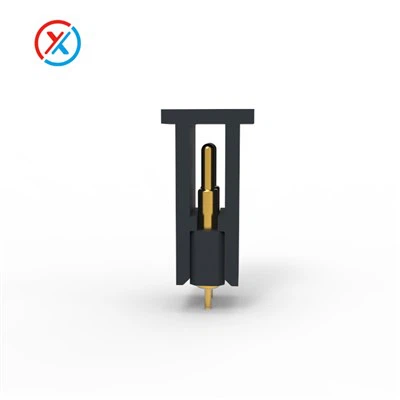
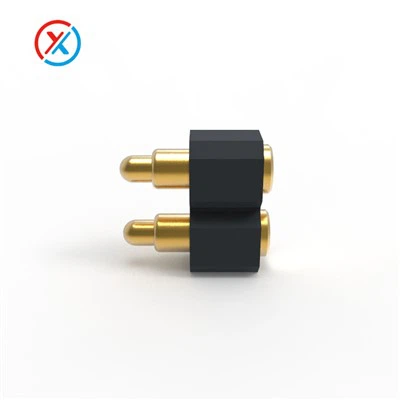
First off, let's talk a bit about what Pogo Pin USB is. Pogo pins are spring - loaded pins that are used in various electronic devices. They're known for their durability, reliability, and ability to make good electrical contact. When it comes to USB, Pogo Pin USB connectors offer a unique solution for quick and easy connections. You can check out more about Pogo Pin Usb on our website.
Now, onto the main question: what's the data transfer speed of a Pogo Pin USB? Well, it depends on a few factors. One of the most important factors is the USB standard it adheres to. There are different USB standards out there, like USB 2.0, USB 3.0 (also known as USB 3.1 Gen 1), and USB 3.1 Gen 2, each with its own data transfer capabilities.
USB 2.0 Pogo Pin USB
USB 2.0 is an older standard, but it's still widely used because it's compatible with a large number of devices. The theoretical maximum data transfer speed of USB 2.0 is 480 Mbps (megabits per second). However, in real - world scenarios, you'll usually see speeds closer to 30 - 40 MB/s (megabytes per second). Yep, there's a difference between bits and bytes! 8 bits make up 1 byte. So, when you convert that 480 Mbps to MB/s, it comes out to about 60 MB/s in theory. But due to various factors like device limitations, cable quality, and interference, the actual speeds are lower.
If you're using a Pogo Pin USB based on the USB 2.0 standard, it's great for basic data transfer tasks. For example, transferring photos from your camera to your computer, or moving small files between devices. It's reliable and gets the job done for everyday use. You can pair it with a Magnetic Data Line for a more convenient connection.
USB 3.0 (USB 3.1 Gen 1) Pogo Pin USB
USB 3.0 is a big upgrade from USB 2.0. The theoretical maximum data transfer speed of USB 3.0 is 5 Gbps (gigabits per second). That's a whopping 10 times faster than USB 2.0! When you convert that to megabytes per second, it's about 625 MB/s. In real - world use, you can expect to see speeds in the range of 200 - 400 MB/s.
This makes a Pogo Pin USB based on the USB 3.0 standard ideal for transferring large files quickly. Say you have a high - definition video that you want to move from an external hard drive to your laptop. With USB 3.0 Pogo Pin USB, it'll take a fraction of the time compared to USB 2.0. And if you're concerned about the environment, you might want to consider our Magnetic Cable Halogen - free And Lead - free which can be used in conjunction with these connectors.
USB 3.1 Gen 2 Pogo Pin USB
USB 3.1 Gen 2 is the fastest of the bunch. It has a theoretical maximum data transfer speed of 10 Gbps. That's double the speed of USB 3.0! Converting to megabytes per second, it's around 1250 MB/s. In real - world situations, you can get speeds upwards of 800 MB/s.
This kind of speed is perfect for professionals who deal with large amounts of data on a daily basis. For example, video editors who need to transfer high - resolution video files quickly, or data analysts who are moving large datasets. A Pogo Pin USB with USB 3.1 Gen 2 capabilities can really boost your productivity.
Other Factors Affecting Data Transfer Speed
It's not just the USB standard that affects the data transfer speed. The quality of the Pogo pins themselves matters a lot. High - quality Pogo pins ensure a stable electrical connection, which is crucial for fast data transfer. If the pins are poorly made or if they're not making good contact, it can lead to slower speeds or even data transfer errors.
The cable that you use with the Pogo Pin USB also plays a role. A high - quality cable with proper shielding can reduce interference and improve data transfer speeds. Cheaper cables might not have the same level of performance, so it's worth investing in a good one.
The devices you're connecting also impact the speed. If one of the devices has a slower internal data transfer rate, that can become the bottleneck. For example, if your external hard drive has a slow read/write speed, even if you're using a high - speed Pogo Pin USB, you won't be able to achieve the maximum transfer speed.
Why Choose Our Pogo Pin USB?
As a supplier, we take pride in offering high - quality Pogo Pin USB products. Our Pogo pins are made with precision to ensure a reliable connection. We offer a range of products based on different USB standards, so you can choose the one that suits your needs. Whether you're a casual user who just wants to transfer a few photos or a professional who needs to move large amounts of data quickly, we've got you covered.
Our magnetic cables, like the ones I mentioned earlier, are designed to work seamlessly with our Pogo Pin USB connectors. They're easy to connect and disconnect, and they add an extra layer of convenience to your data transfer experience.
If you're interested in purchasing our Pogo Pin USB products or just want to learn more, don't hesitate to reach out. We're here to answer any questions you might have and help you find the right solution for your data transfer needs. Whether it's for personal use, in a business setting, or for a specific project, we can work with you to meet your requirements.
So, there you have it! A breakdown of the data transfer speeds of Pogo Pin USB. I hope this blog has been helpful in understanding how these connectors work and what kind of performance you can expect. If you have any more questions or need further advice, feel free to drop us a line. We look forward to hearing from you and helping you with your Pogo Pin USB needs.
References
- "USB Implementers Forum." Information about USB standards and their specifications.
- "Electronics Engineering Handbooks." General knowledge on electrical connections and data transfer principles.