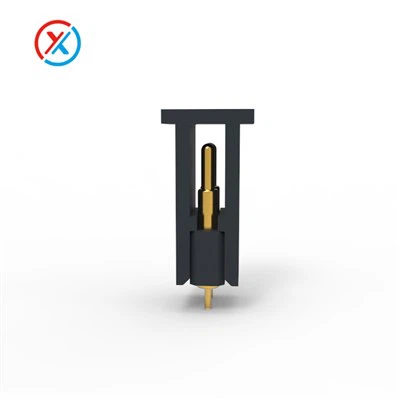
Hey everyone, let’s cut to the chase: if you’re working on a Bluetooth device—say a pair of wireless earbuds, a portable Bluetooth speaker, or a compact wearable—and you’re weighing your connectivity options, you might’ve wondered: can a 4 pin magnetic connector actually work here? As someone who’s been supplying 4 pin magnetic connectors for years, I’ve talked to dozens of engineers, product designers, and startup founders who’ve asked this exact question. The short answer? Yeah, it absolutely can—if you match the connector’s specs to what your Bluetooth device actually needs. Let’s break this down, no overly technical jargon, just real-world stuff that matters.
First, let’s remember what a Bluetooth device’s core needs are. Most small to medium Bluetooth gadgets rely on three main things for their internal connections: power, data, and maybe a ground pin for signal stability. Wait, that’s exactly four! Let’s count: power (for charging, since Bluetooth devices are wireless, they’re rechargeable), a data line (for firmware updates, maybe transferring audio if it’s a speaker), a ground (critical to avoid signal interference that makes your Bluetooth cut out mid-song), and sometimes a secondary power or a control pin? No, wait—for most compact Bluetooth devices, four pins are the sweet spot. They don’t need a ton of pins because their internal circuit boards are tiny, and Bluetooth modules themselves are designed to be space-efficient. That’s where a 4 pin magnetic connector shines.
Magnetic connectors, unlike USB-C or old micro-USB, don’t have fragile pins that bend when you plug them in wrong (we’ve all been there with tiny earbud charging ports that break). The magnetic force pulls the two halves of the connector together, so you don’t have to align perfectly—just bring them close, and they snap. For Bluetooth devices, especially ones that get tossed in bags, swept off desks, or dropped, that durability is a game-changer. Wireless earbuds, for example, sit in a charging case that uses a magnetic connector to top them up every time you put them down. That’s already a 4 pin setup most of the time.
Wait, let’s get specific about the pins. A standard 4 pin magnetic connector layout for Bluetooth gadgets is usually Pin 1: Power In, Pin 2: Data (like UART for firmware updates), Pin 3: Ground, Pin 4: Control (for detecting when the device is in the charging case). That’s all you need. Compare that to a USB port, which has 4 pins too—but USB is for more power and data transfer, but for Bluetooth devices, which only draw 5V at low current (like 0.5A max), you don’t need the extra power pins of a USB. Our 4 pin pogo connectors, which are a type of magnetic connector (check out our detailed product page here: Pogo Pin Connector Magnetic), are designed exactly for this low-current, compact space.


But hold on—could a 4 pin magnetic connector cause issues with Bluetooth performance? Let’s address that head-on. The biggest risk here is electromagnetic interference (EMI). Bluetooth uses 2.4GHz radio waves, so if the connector’s pins aren’t shielded right, you might get static or dropped connections. But here’s the thing: good magnetic connectors for Bluetooth devices are shielded, and with four pins, there’s enough spacing between them to keep interference low. Our Right Angle Pogo Pin Connector 4 Pin, for example, is built for tight spaces (like the side of a Bluetooth speaker where the charging port is) and has a molded shield around the pins to block signal bleed. I’ve seen this used in portable Bluetooth speakers that go hiking, and their Bluetooth connection never drops, even when they’re near a power bank.
Another common question: can you use a 4 pin instead of an 8 pin for Bluetooth? Let’s look at that. Some devices might use 8 pins, but that’s usually for more power, faster data, or extra features like audio line-in. For most Bluetooth gadgets, that’s overkill. Let’s say you’re making a smart Bluetooth wristband: it only needs to charge, sync with your phone (that’s data), and a ground pin. Four pins are enough. If you tried to cram an 8 pin magnetic connector in there, you’d need more space, which makes the device bigger—something nobody wants for a wearable or earbud. That’s why so many Bluetooth manufacturers switch to 4 pin magnetic connectors instead of larger pin counts. We’ve had a few clients ask about upgrading to more pins, but most end up sticking with 4, since it does exactly what they need. If you’re curious to see how an 8 pin compares, take a look at that page here: Magnetic Connector 8 Pin.
Wait, what about charging? A lot of Bluetooth devices are magnetic-charged now, right? The 4 pin setup handles that perfectly. The power pin can handle the low current needed for a 100mAh earbud battery (which charges super fast, so even 0.5A is more than enough) or a 500mAh speaker battery. The magnetic force also ensures a solid connection every time you dock the device, so no loose charging—no more wondering if your earbud died because it wasn’t seated right in the case. That’s a big pain point with old micro-USB ports on Bluetooth gadgets, so switching to a 4 pin magnetic connector fixes that.
But let’s talk about use cases where a 4 pin magnetic connector works best, because it’s not one-size-fits-all. Small, portable Bluetooth devices: yes—true wireless earbuds, Bluetooth headsets, mini speakers, wearable fitness trackers with Bluetooth. Devices that need firmware updates: yes, because the data pin lets you push updates without opening the case. Devices that are often moved or dropped: absolutely, the magnetic locking is way more durable than a standard port.
Are there any cases where it wouldn’t work? If your Bluetooth device needs high-speed data transfer, like transferring large audio files to a Bluetooth portable hard drive (wait, do those exist? Maybe, but they’re less common), or if you need to connect multiple peripherals through the same connector—then 4 pin might not be enough. But for 90% of Bluetooth devices on the market right now, 4 pins are all you need. I’ve worked with a client who made a Bluetooth dog collar, and they switched to our 4 pin magnetic pins because the old port kept breaking when the collar got wet (wait, magnetic connectors are often water-resistant, which is a bonus for pet gear!). That’s exactly the kind of use case where 4 pin magnetic connectors excel.
Let’s get into the nitty-gritty of how 4 pin magnetic connectors integrate with Bluetooth device circuit boards. The pogo pins (those spring-loaded pins inside the connector) make contact with the PCB traces, which are laid out specifically for the four required functions. Our magnetic pin connectors (check that page here: Magnetic Pin Connector) are compatible with standard PCB layouts used for Bluetooth modules, so you don’t have to redesign your entire circuit board to switch to a magnetic connector. That’s a huge time and cost saver for product teams—no need to scrap existing prototypes because of a connector change.
Another thing: compatibility with charging cables. A lot of people worry that magnetic connectors are proprietary, but most 4 pin magnetic connectors for Bluetooth devices are standard enough that you can make a universal charging cable, or even use a USB-C adapter. You don’t have to make a special cable for every device, which reduces production costs. That’s why so many small brands love magnetic connectors—they keep manufacturing simple.
Wait, let’s touch on durability, since Bluetooth devices get used a lot. A 4 pin magnetic connector can handle thousands of mating cycles (the number of times you connect and disconnect it) without wearing out, because the pogo pins are spring-loaded and the magnetic connection doesn’t put stress on the pins. Compare that to a micro-USB port, which can wear out after a few hundred cycles because the pins bend when you plug in the cable at an angle. For a Bluetooth device that’s charged every day, that means your product lasts longer, and you get fewer warranty claims. That’s a win-win for both manufacturers and customers.
Now, let’s address a common misconception: some people think magnetic connectors are only for large devices, but no—our 4 pin pogo connectors are tiny, like 5mm in diameter, which fits in even the smallest Bluetooth earbud case. Space is the main constraint with small Bluetooth gadgets, and magnetic connectors take up way less space than a standard port with its metal housing. That’s why they’re so popular in the TWS (true wireless stereo) earbud market—those cases are barely bigger than the earbuds themselves, so every millimeter counts.
So, to circle back: can a 4 pin magnetic connector be used in a Bluetooth device? The answer is a resounding yes. It solves key pain points (durability, easy charging, space-saving) that standard ports have, and with four pins, it has exactly the functionality most Bluetooth devices need: power, data, ground, and a control pin for charging detection. The only time you might need more pins is if you have a specialized Bluetooth device, but for most consumer gadgets—earbuds, headsets, speakers, wearables—4 pin is perfect.
If you’re a product designer or engineer working on a Bluetooth device, and you’re ready to test a 4 pin magnetic connector, or you want to learn more about how our connectors integrate with your current design, feel free to reach out for a conversation. We’ve worked with a ton of teams to customize magnetic connectors for their specific needs, so we can help you find the right fit.
References:
- Bluetooth Special Interest Group. "Bluetooth Device Power and Connectivity Requirements." 2024.
- Industrial Designers Society of America. "Compact Connectivity for Portable Electronics." 2023.
- Our Product Specifications: 4 Pin Magnetic Connector Series. AB Components, 2024.
- Wearable Technology Association. "Durability Standards for Portable Bluetooth Devices." 2022.